Go here to be able to copy paste pages from your mobile
http://cousinisaac.com/mobitol/
We all know the nightmares of copy paste, especially into a blogger post. With the new Nokia E72 you can only do it this way. You need to be able to capture the post by sending it as an email. Then you want to open another browser called Bolt that will shade any area of text and copy it to its clipboard. Yes its clipboard. Yes a pain in the ..... Anyway you then need to open a blogger post page in bolt and a blogger post page in the normal S60 browser and use the ctrl of the key pad and shade the page in bolt over to the S60.
So you ask yourself what a waste of time eh.
Wouldn't it be nice if some geek out there told me or made a tool that allowed us to shade any webpage and give us the option to drop it in any social networking or blogging or forum or whatever post from there was?
The Symbian people are falling behind in this area. The Windows people have a piece of kit called JZ Smartmort which does a grand job of copy paste. And then you got the pinchies as I call them who pinch a sentence or two with their fingers and paste it some where on their itoy. Blackberry does it better than all but you can't get skyfire on bb. And that would be the ultimate solution.
So it looks like this E72 is going back, if nothing else for its built quality. I have had it for four days and it sqweeks and cracks all over the place with that rubbish battery flap on it. It is a shame that both the new Bold 9700 and this new E72 are so poorly made. If I didn't know better i would be thinking that the same factory made them both.
So I will miss the layout of the qwerty but it is nice to have the full stop put there for you on the keybooard without the shift which is the case with the blackberry. But the Nokia will put a cap letter at the beginning of the sentence of a paragraph, but not the sentence after a full stop.like here you see it did not make the l into an L. and here again the a is not A.
But look it put the B in after I put a spare line in to start a paragraph. Also the Nokia is dumb to not see an i and convert it to an I in a middle of a sentence.
So that's it for now.
Showing posts with label browser. Show all posts
Showing posts with label browser. Show all posts
Thursday, 10 December 2009

Sunday, 22 November 2009
Nokia N900
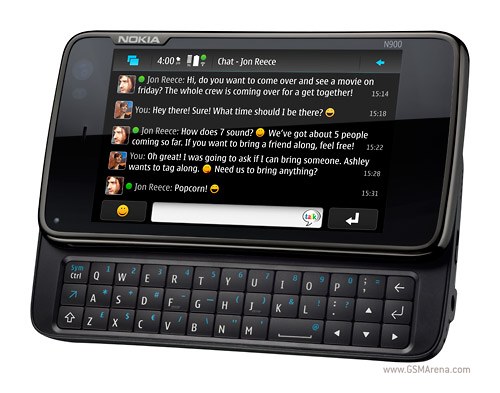
I have decided that this new device from Nokia really represents a new approach to mobiles, laptops and everything imbetween.
For so long we have all struggled with Blackberrys and Windows based phones to get info on the web without being stuck behind a desk. I have bad eye-sight, and it is so much easier to bring keyboards closer to your face. Coupled with the fact that I have a bad right hand, typing is tiresome.
So thumb typing devices are great. And it looks like Nokia N900 with all its glorious specs on the browser and so much more could just be the ticket. I am waiting for its release sometime in the first week of Dec if Expansys is to be believed.
Thursday, 12 February 2009
Skyfire
If you really want to have a great browser, then get Skyfire. Shame they don't make one for Blackberrys. But they have just made one for Sony Ericsson Xperia X1
Friday, 21 November 2008
From Sony Ericsson Xperia X1 to Blackberry Storm 9500
So in the video, Kevin visited four sites, NYTimes.com, WSJ.com, CrackBerry.com and ArsTechnica, he made certain that both phones had Javascript enabled. The results were as follows: NYTimes.com - iPhone 3G wins, WSJ.com - BlackBerry Storm wins, CrackBerry.com - BlackBerry Storm wins ArsTechnica - BlackBerry Storm wins.
My saga continues. Oh lord, when will I finally settle down, and be content. The Sony Ericsson Xperia X1 turned out to be really good for music. Those panes are a joke, as you cannot customize them. You can get a couple more at the Windows site. But the whole point was to put your own links, and I could not do that. The Vodafone Business Email sucked bad. I called Vodafone and they said they do not support it for the X1. And finally the internet browsing was slow, and jammed all the time, such that I had to soft boot it all the time. Oh also, that metalic keyboard reflects unwanted light that makes it really hard to type in day light. So that was that, and it had to go back.
Now I asked them about the new Storm, and whether that Business Email was supported, and they said that that is supported by BB themselves. So they arranged an exchange within the 14 day trial. So folks I have now the new Storm.
My first impressions are not completely great. There is a marketing con going on with the BlackBerry Storm right now. The ad clearly states that you press on the button, it turns red, and you feel a response. Now wait a minute. It makes you think that you feel the button or the button that glows red. The fact is that you do not feel the button. You feel the whole glass move down. So the way to use the device is to move your finger over the button you want, and unlike the iPhone you do not type a letter that you did not want. But what you get is a moment to see if the red glow is going to go on another button, just in case your finger is too fat, and then you press the glass down. So the BB ad department is out of line.
So what does the typing experience feel like with avid Bloggers like me. Well the large screen is great. I can see a lot, and zoom into the pages nicely in page or column format. The trouble begins when you try to tap on a link that is on a list of other links. The software is so clever that it zooms in until the button is as big as the whole screen, and then it can be selected. Now if you use the cursor on the Blackberry Curve, it will just select the link and then you press the pearl. It is so much faster, and you do not have your own finger in the way of the area you are looking at. I think the next version of Storm should have a pearl on it, so that you can do both if you want to.
The sound is fantastic, and the cut and paste is really neat. I am still struggling trying to get all the applications to run. Also the battery needs a couple or so full discharges to get good. It really needs a beefier battery, but then the weight comes in. I like it being a bit big. It is not flimsy and feels as if it will last a long time. The leather pouch has stitches that are not done too well, such that pieces of leather get caught on the buttons as you are sliding it in, lifting the buttons and tearing them off. So I squeezed the sides to make it loose, and I think I messed up the contact, and so it does not open the email as soon as I pull the body out of the pouch. Then one other thing. Let's say you want to delete a whole bunch of emails which you have already read on the web, then what. You need to go through each one. On the curve or WM 6.1 device you just run your fingers over the lines and click mark opened. That is not there.
All of this in just two days. I hope someone can benefit from this report so far.
Subscribe to:
Posts (Atom)